


 LIT PATHGeorgia Edition
Your coaching partner for Georgia's K–5 classrooms.
LitPath helps instructional coaches and teachers plan, make and assess lessons tied to the real Georgia standards, and gives coaches one place to run their coaching. At the center is Jay, an AI assistant that works from the standards themselves.
- ELA, Math and Social Studies, K–5
- Built for district leaders, coaches and teachers
Sunday, November 22, 2026
12:00 AM Eastern. LitPath, Georgia Edition is a brand-new pilot, so there is time to look closely before it opens.
Beta testing opens November 22, 2026.
Beta testing is open.
An assistant that knows Georgia's standards, and the work of coaching.
LitPath, Georgia Edition is a web app built on the Georgia Standards of Excellence for ELA, Math and Social Studies, kindergarten through grade 5. Teachers and coaches talk to Jay, or use purpose-built tools, to get ready to teach, make what they need, check their work and, for coaches, keep their support organised.
How it helps
- Get ready to teach. Teaching Points, Lesson Openers, scaffold plans and jigsaws, each tied to a real Georgia standard.
- Make what you need. Editable slide decks and anchor charts, ready for the wall or the screen.
- Check your work. Is this task pitched at the right grade? Which standard does it hit? Is a revision worth making?
- Coach with less paperwork. Coaching plans, tasks and a private Coaching Log that keeps track of what you said you would do.
Works in your browser. An iPhone and iPad app is in preparation.
Who it is for
Three audiences, one product. Jump to yours.
Built around the individual teacher or coach, not a generic chatbot.
Jay is LitPath's AI assistant. Ask who it is and it says so: an AI, never a person. The goal is an assistant that gets to know how you work.
Upfront: the part that learns you over time is the very next thing we are building.
We would rather tell you than let you assume. Jay already remembers a few things about how you work (below), but a Jay that learns your teaching focus and style and carries it into everything it writes for you is actively in development and not finished. Right now the Plan, Make and Assess tools do not personalise to you.
In the app today What Jay does now
- Works from the real standards. Jay's answers about standards, and the planning and making tools, are grounded in Georgia's standards database, not guesses from the open web.
- Adjusts to who you are. In Coaching rooms, Jay talks with a teacher as a colleague, helps an instructional coach plan how to coach, and helps a district-level coach think across schools.
- Carries a conversation. Each question builds on the conversation so far until you press New.
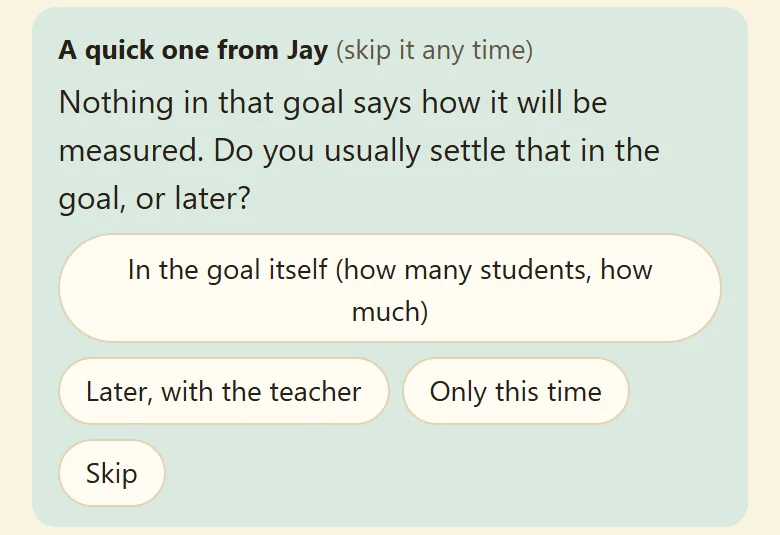
- Remembers a preference. When an ELA request could mean a whole standard or one of its expectations, Jay asks with two buttons. After a few consistent answers it stops asking and answers at your usual level. Type “ask me again” to reset.
- Talks, hands-free. Pick a male or female voice. Jay stops listening when you pause for 2, 2.5 or 3 seconds, then reads the answer aloud.
Being built next Jay that learns you
- Your teaching focus and style, carried into Teaching Points, Lesson Openers, decks and the rest, so what you get sounds like it was written for you.
- Learning over time, not just within one conversation.
Early groundwork is already in Coaching. There, Jay can learn how a coach likes to work from what you do and say: which strategies you choose, how you reword a plan, how you follow up. It may ask one short question, and you can always skip. You can read what Jay has noted, delete any of it, switch it off, or have Jay forget everything.
In Coaching plans, rooms and the Coaching Log, LitPath is built to keep teacher names out of what goes to AI and into Jay's memory. It catches clear names but cannot promise to catch every one.
Jay is always one tap away
On a computer or tablet, Jay greets you in the bar at the bottom of every screen: type, attach a photo or PDF, paste a link, or tap the microphone and just talk.
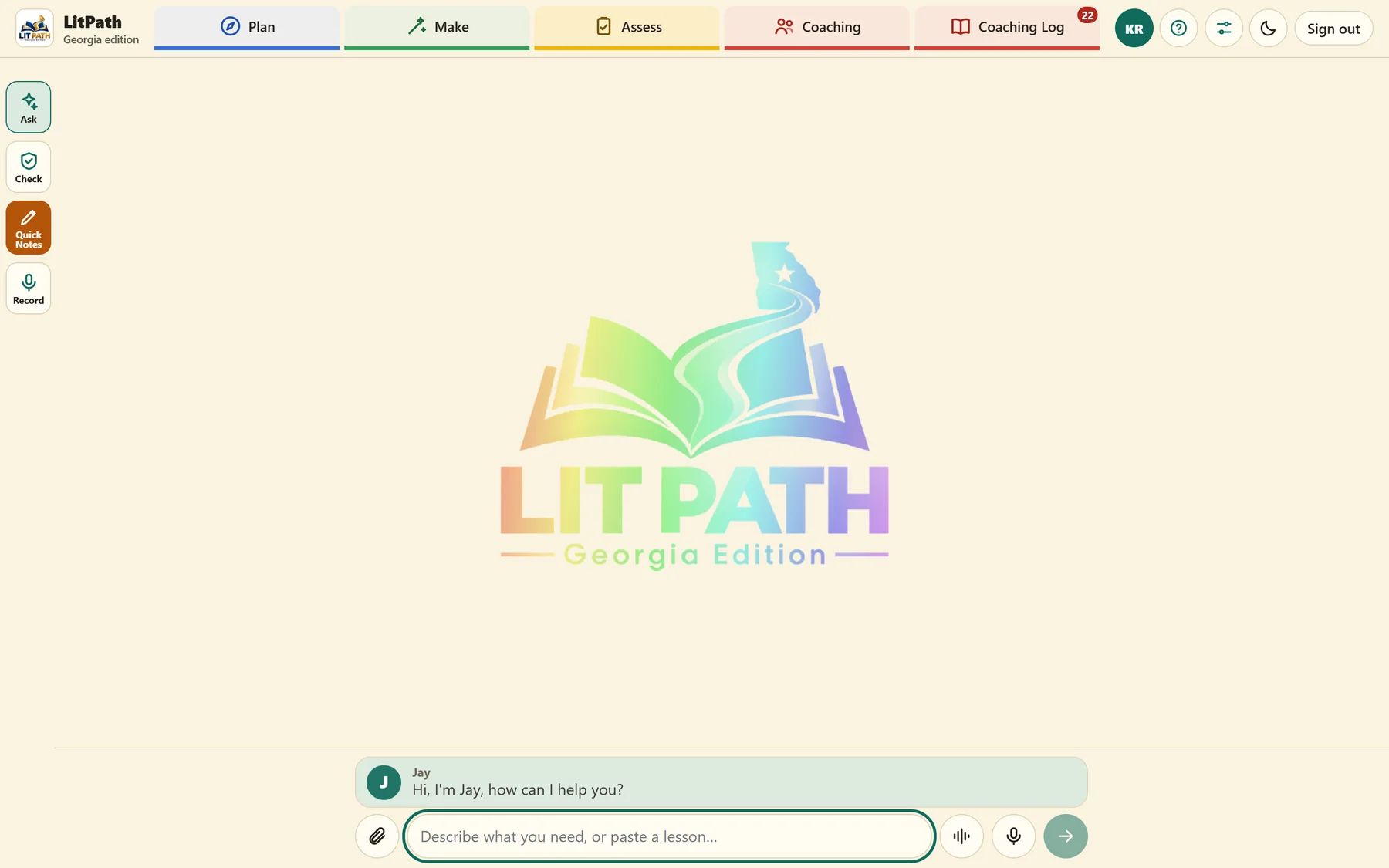
One workspace: five buttons, and Jay always in the bar below. Screens on this page are from the current build, with sample data.
Plan it. Make it. Check it.
The main tools sit behind three coloured buttons: Plan, Make and Assess. Each result is tied to a real Georgia standard (or, for decks and charts, to your own objective if no standard fits).
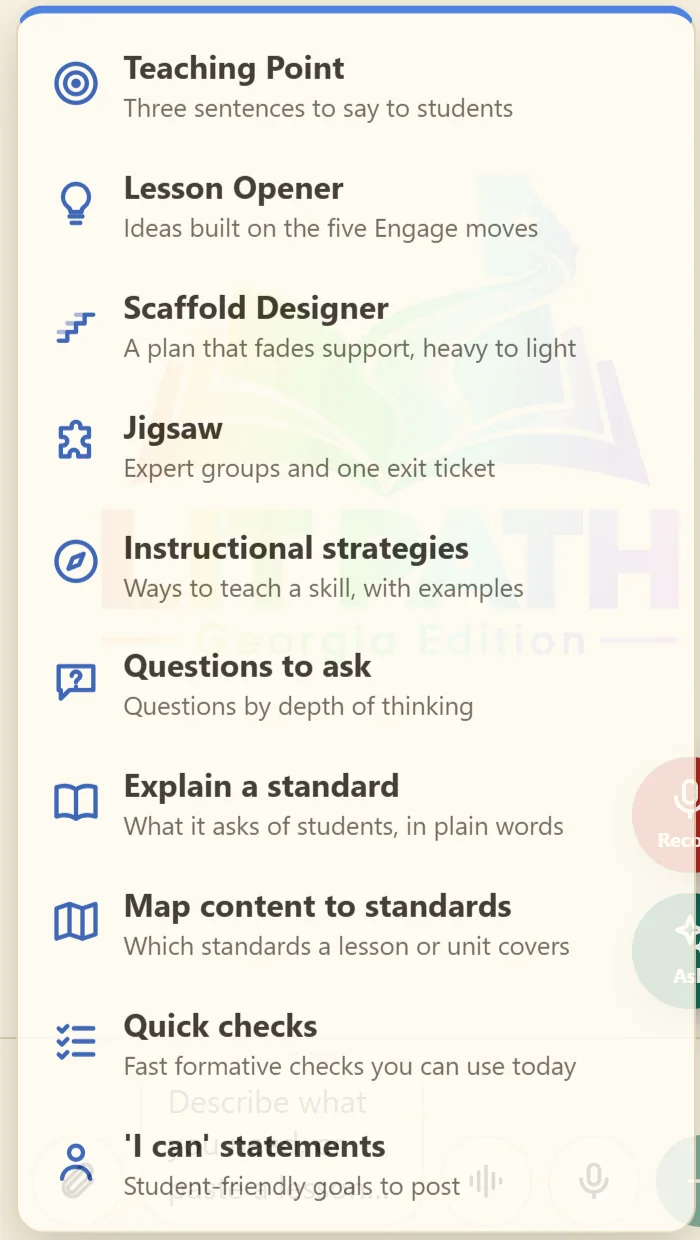
Four planning tools, plus six quick starters.
- Teaching Point. Three sentences to say to students (what they will learn, how, and why it matters) in the standard's own verb, in the Atlanta Public Schools Learning Commitments wording format.
- Lesson Opener. Several ideas for opening a lesson, each with an example activity, built on the five Engage moves.
- Scaffold Designer. A five-stage plan that fades support from “I do” to “You do”, every stage tagged to the standard's expectations. ELA, grades 3–5.
- Jigsaw. A text in sections, expert groups, and an exit ticket that cannot be answered without every section. ELA, grades 3–5.
Quick starters: instructional strategies, questions by depth of thinking, a standard explained in plain words, map content to standards, quick checks, and ‘I can’ statements.
Slide decks and anchor charts you can actually edit.
- Slide Deck. A presentation-ready deck of 7–14 slides with speaker notes, tied to real Georgia standards. Download a real, editable .pptx for PowerPoint, Keynote or Google Slides.
- Deck Studio. Drag, resize and edit on a canvas, with undo and a full version history. Or upload your team's own PowerPoint and add new slides in its template.
- Anchor Chart. Steps, vocabulary, compare or strategies. LitPath draws it so the words are exactly what was written, or an AI picture maker draws it.
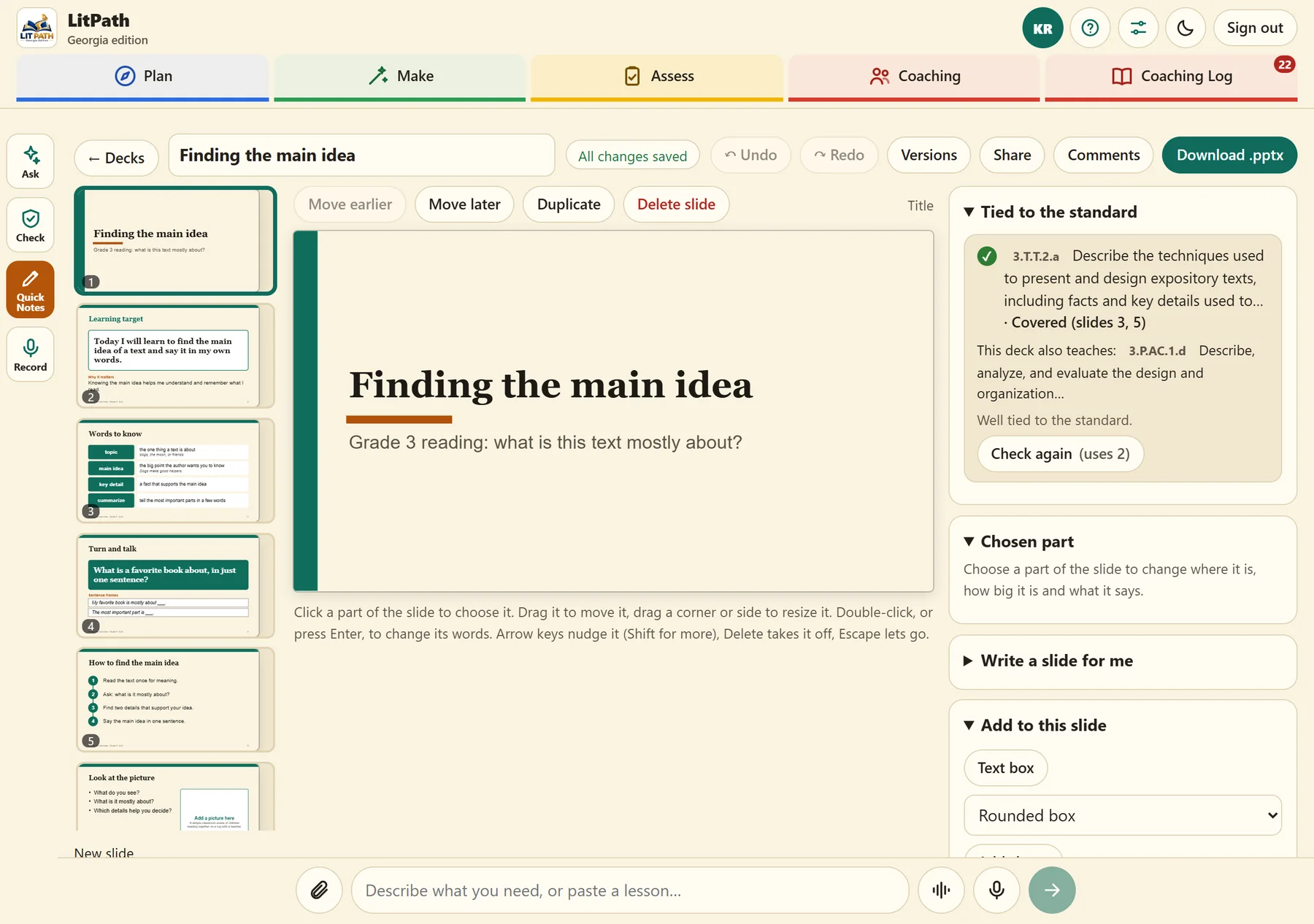
Deck Studio: every deck records the real standard it is for, and can be checked against it (an AI's judgement, not proof).
GMAS-style practice, built on the state's published blueprint.
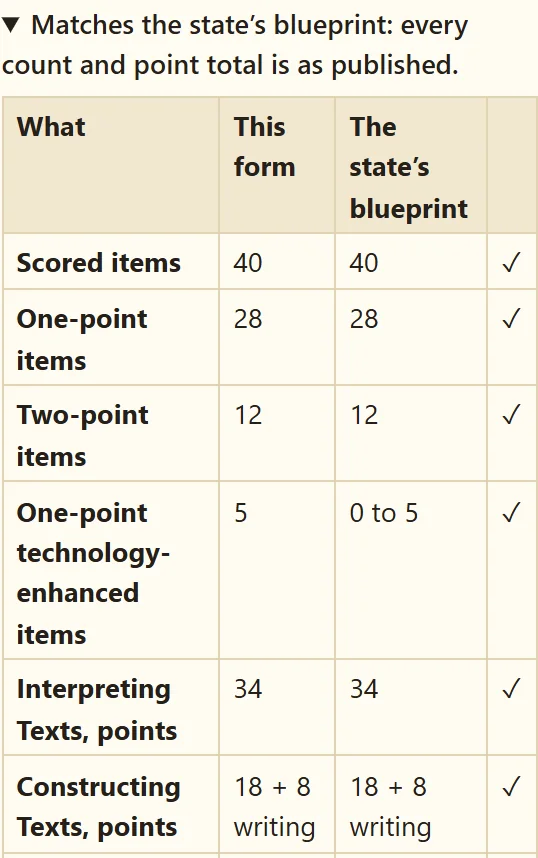
GMAS Practice writes original ELA practice items for grades 3–5 in the state's own item types: a practice set for one standard, or a whole-test form. Each item is checked before you see it, and anything that does not hold up is dropped.
Practice only. These are not official or released GMAS items, and the writing task is hand-scored. Covers the 15 standards per grade that have state achievement level descriptors.
And a checker for any task
Check takes a question, activity or textbook task, typed or as a photo, finds the standard and expectation it fits, says whether it is pitched at the right grade, estimates the Depth of Knowledge, and suggests a revision. For ELA grades 3–5 it also estimates the achievement level. It is a model's judgement and it can be wrong.
And around the tools
Ask
Ask in your own words, or paste a lesson, a screenshot, a PDF or a link and ask which Georgia standards it covers and how to teach it. “Did I already ask this?” searches only the conversation you are in.
Notes and recording
Capture a teacher's question in a tap. Or record a walkthrough or meeting and get a short, cleaned-up note (not a transcript) with the standards mentioned linked to their pages. The audio goes to a speech-to-text service and is not kept on LitPath's servers. Follow your school's and district's rules about recording.
Standards pages
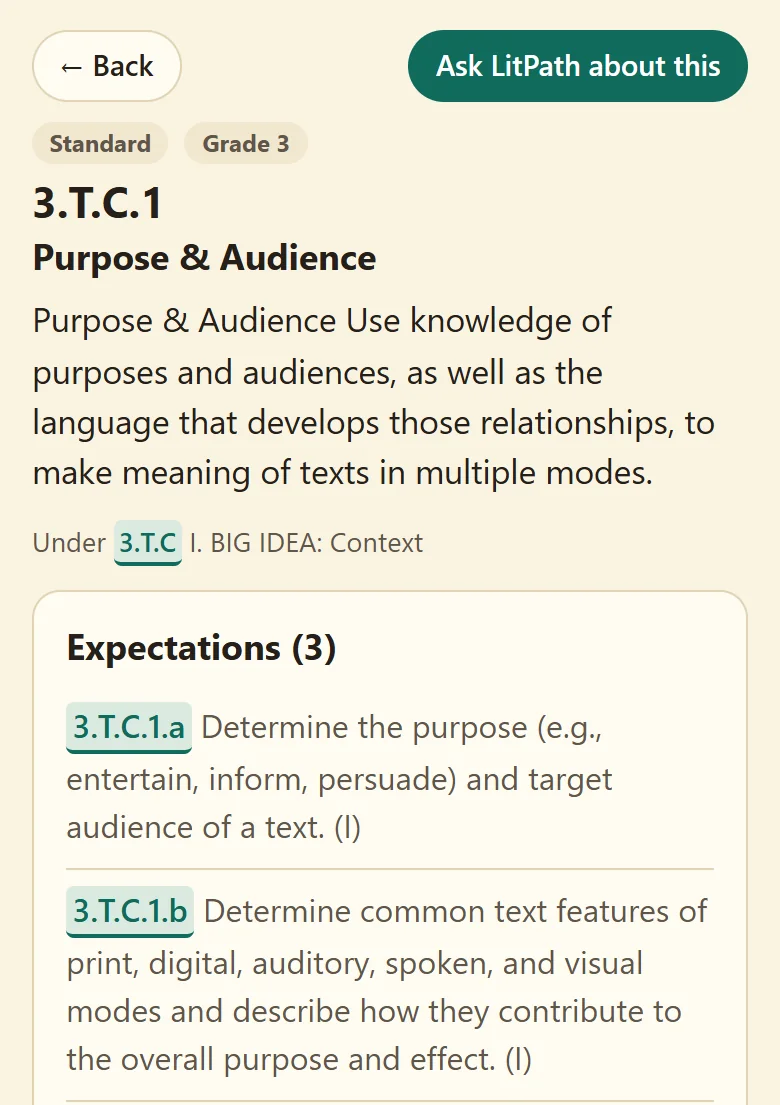
Open an ELA standard and see its statement, its expectations, the same skill in every grade, achievement level descriptors (which the state marks as draft) and glossary terms.
Bank and History
Save any result, or one piece of it, into collections you organise by school, standard or any way you like. Reopen past conversations and carry on. Copy, PDF and print are one menu away.
Grounded in the real standards
Georgia's ELA, Math and Social Studies standards for K–5, loaded from the state's own standards feed. Tools refuse to invent a standard that is not there.
Built-in explainer videos
Two narrated, captioned videos inside the app: a three-minute About, and a fifteen-minute Tutorial that walks through every tool. Jay does the narrating.
Build it together, a deck at a time.
Share a slide deck or a collection of saved items with a colleague, or with a whole school or grade team. It is built for teams who build one thing over time. It is not live typing together.
 AI-generated
- Share by email address or by team. A team is a name and a list of addresses, so a whole school is one share.
- Editors work on it with you. Viewers can look, comment and make their own copy. Only the owner shares, removes people or deletes.
- Every version says who saved it. If two people edit, changes to different slides, or different parts of one slide, are combined automatically.
- A real clash is your call. If you both changed the very same thing, you choose “Use theirs” or “Keep mine”. No saved version is ever overwritten, and the other version stays in the history.
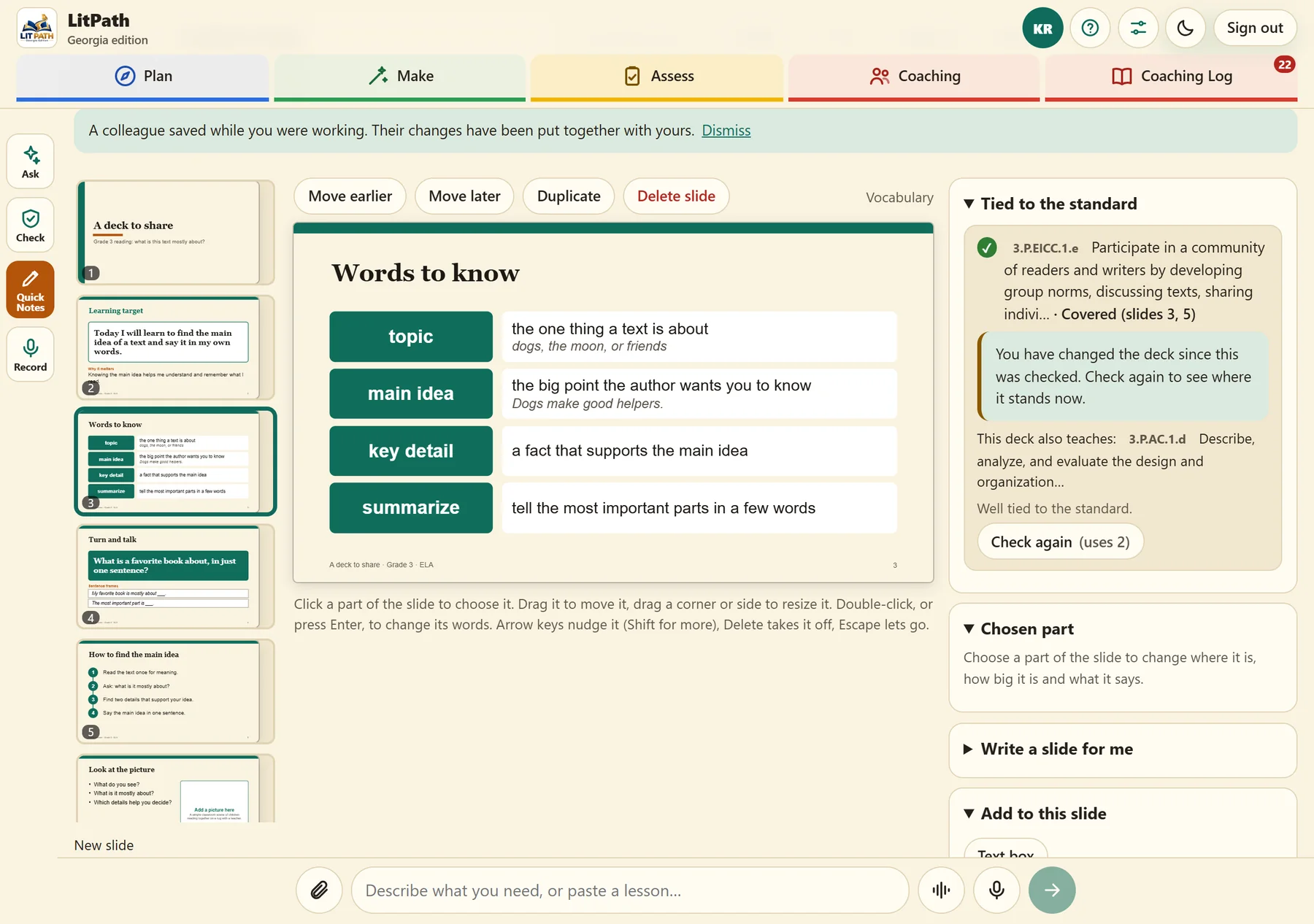
A colleague saved while you were working, and their changes are merged with yours.
Comments, and who else is here
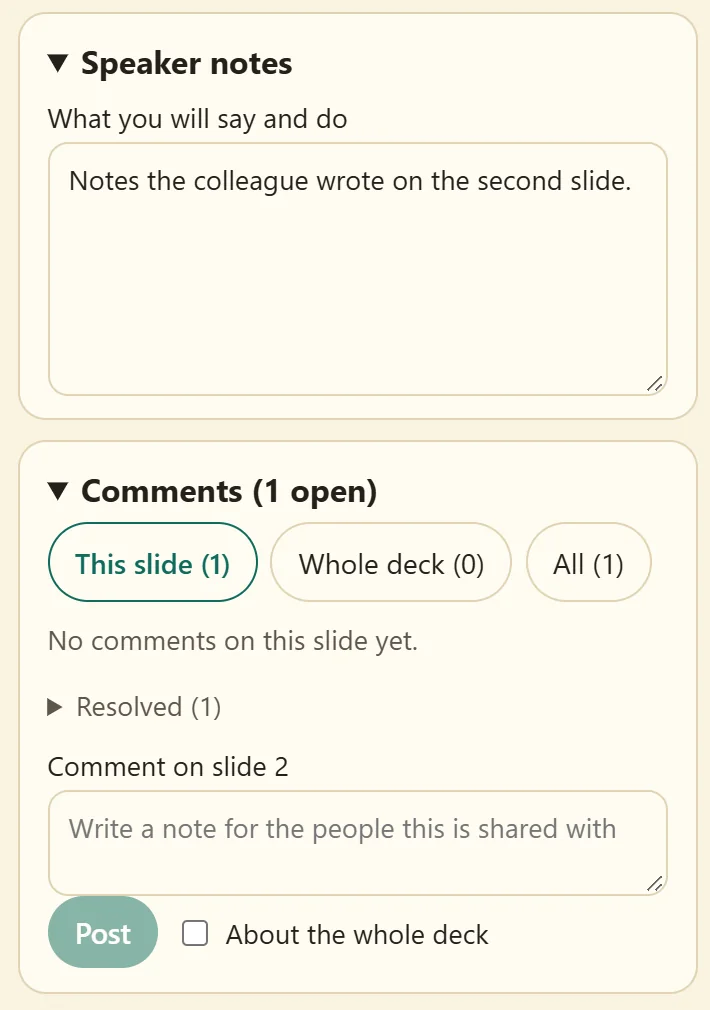
- Comment on a slide or the whole deck, and resolve threads when they are done.
- See who has the deck open and which slide they are on. An open deck checks about every 15 seconds and tells you when a colleague has saved.
- Share a collection of saved items, such as a school's strategies or a grade team's openers. A viewer can copy items into their own bank, and each person's notes and tags on an item stay private.
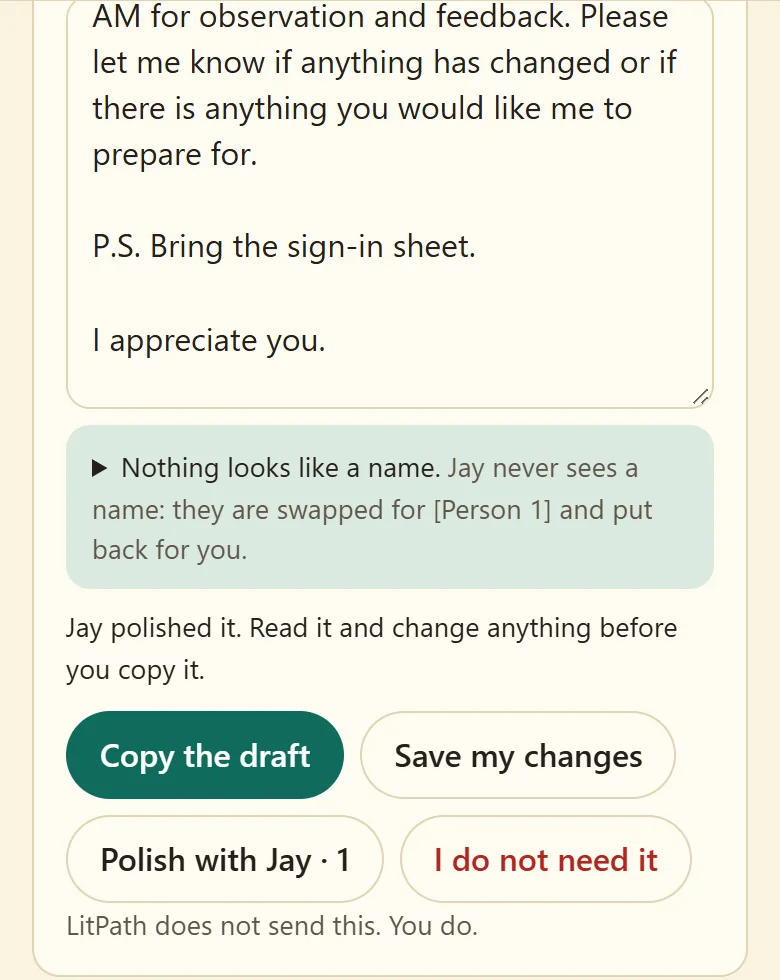
- Nobody is emailed. LitPath shows you a link to send.
Coach and teacher, too
In Coaching, a coach can share a teacher copy of a coaching plan as a link that needs no account, and turn it off whenever they like. The coach's own notes stay on the coach's copy.
Your own private record of the support you give schools.
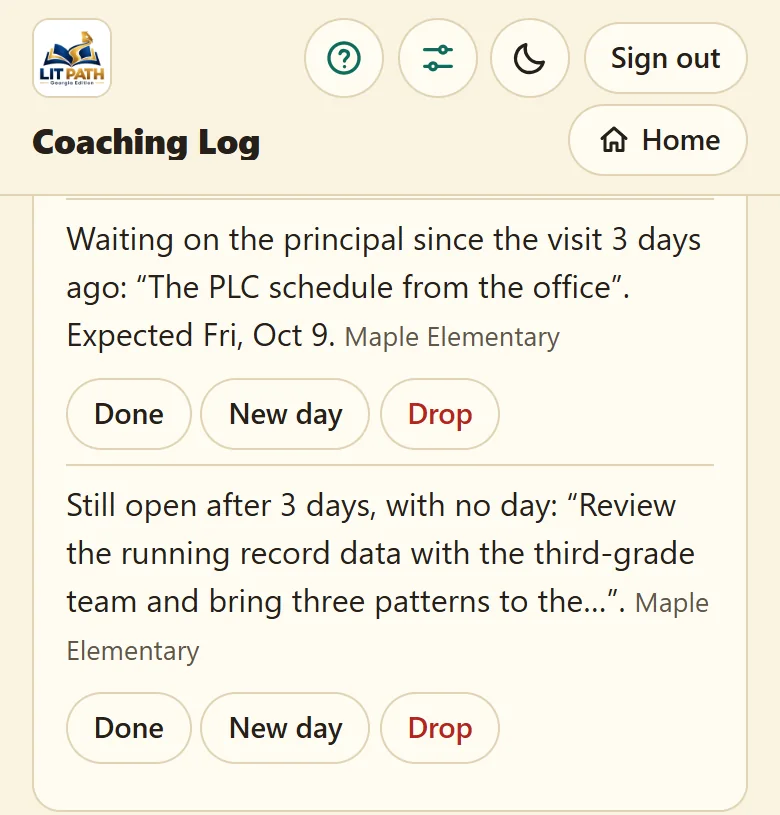
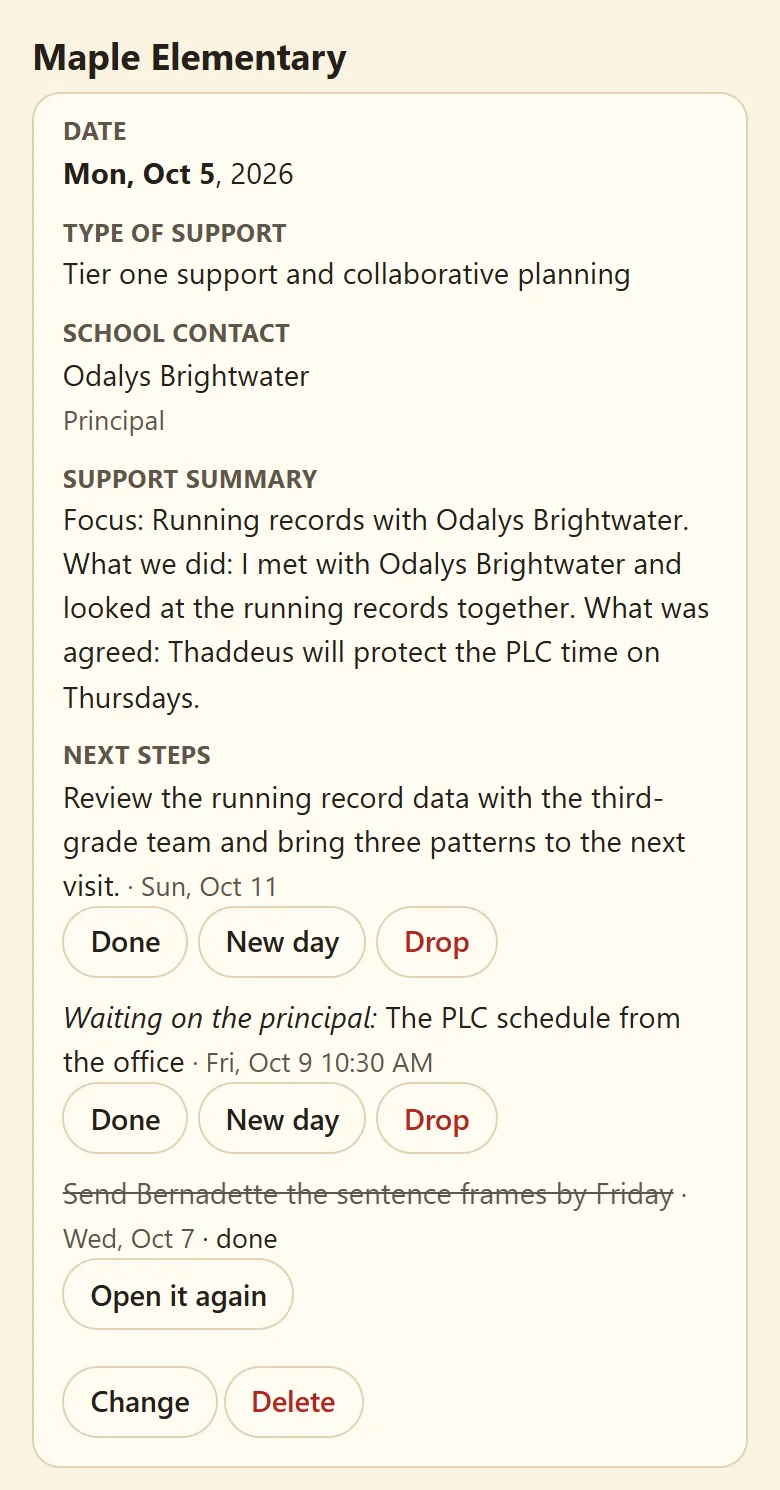
Laid out like the spreadsheet a coach already keeps: school, date, type of support, school contact, support summary and next steps. Only you can see it: not a teacher, and not another coach.
 AI-generated
Jay helps, you decide
- Summaries in your voice. Say or type the visit the way you would tell a colleague. Jay writes one to four labelled lines and adds nothing you did not say. Nothing is saved until you save it.
- Next steps checked for clarity. Jay says whether each step is clear, and why not if it is not, and may suggest a sharper wording. You take it or keep your own.
- Drafts from recordings. Record a walkthrough or meeting and Jay drafts the Log entry. It is never an entry until you read it, fix it and keep it.
- Sense of a good next step. It starts with plain defaults and is meant to become yours, from what you keep and change.
Organised, and yours
- Seven kinds of support, in the words of a coach's own spreadsheet, from data analysis and action planning to observation and feedback.
- Plan ahead. Log a visit before it happens, then mark “It happened”.
- Reminder drafts are ready the day before a dated step or planned visit. A number on the Coaching Log button tells you, and you copy and send them yourself.
- Take it with you. Copy, PDF, print, or a spreadsheet (CSV) file.
- Private. Names are swapped for placeholders before anything reaches an AI service. Best effort: you can add words to always hide.
Still to come: importing the spreadsheet you already keep.
Something your district can evaluate, and put in your coaches' hands.
LitPath, Georgia Edition is a brand-new pilot. For a district, it is a chance to look at one consistent set of tools for coaches and teachers, built on the Georgia Standards of Excellence, before deciding anything.
Coaches supporting coaches, and teachers, in the buildings where it happens.
District-level coaches work alongside instructional coaches, and coaches work alongside teachers. LitPath is meant to put that whole chain on the same Georgia standards and the same tools, with ways to share what they build.
 AI-generated
 AI-generated
Bring your standards. Disseminate both at once. Not live yet
The aim for districts: LitPath ingests your district's own standards alongside Georgia's state standards, so the coaches and teachers you support work from both, in the same tools, at the same time.
Today LitPath is built on Georgia's standards alone. Taking in a district's own standards is not in the app yet.
What a district can evaluate today
Georgia's standards, built in
ELA, Math and Social Studies for K–5, from the state's own standards feed. Planning and making tools are tied to a real standard. ELA achievement level descriptors for grades 3–5 are included, as the state publishes them: marked draft.
One toolkit, three kinds of account
Accounts are district-level coach, instructional coach or teacher, chosen at sign-up. A district-level coach and an instructional coach get the same tools, and Jay speaks to each in a way that fits the role.
Sharing across a school or grade team
Decks and collections of saved items can be shared with a whole team by email list, with owner, editor and viewer roles, and a version history that records who saved what.
Coaches' records stay with coaches
Each coach's Coaching Log is visible only to that coach. Coaching plans never hold a teacher's name, and a teacher sees only the teacher copy a coach chooses to share.
Straight answers
- People decide. Jay can be wrong. Everything it writes is meant to be read and changed by the educator.
- Recording is optional. Where it is used, LitPath asks people to follow their school's, district's and state's rules about recording.
- It is a pilot. Beta testing opens November 22, 2026 .
More support for the people who support everyone else.
You cover several schools, chase next steps across spreadsheets and email, and build most of what you share from scratch, often with little backup. Your district may not even know LitPath exists yet. You can still see what it would do for your week.
One-on-one, or leading the PLC.
Whether you are sitting beside one teacher or leading a team through a conversation, the work is the same: get everyone to a clear next step. LitPath keeps the plans, the notes and the follow-through in one place.
 AI-generated
 AI-generated
A Coaching Log that keeps up
Jay writes the summary from what you say, checks your next steps, and lists what you said you would follow through on. See the Log.
Coaching plans
Set goals with a teacher, and tie each to a real Georgia standard. LitPath finds short, teacher-friendly videos, articles and routines, keeps only those that pass four plain tests, and builds a timeline with check-in days.
Rooms with Jay
Talk through a goal with Jay. Or record a live coaching conversation: the audio goes to a speech-to-text service and is not kept, you read and fix the words, and what was agreed becomes tasks you approve.
A caseload that tells you who is next
One row per plan, with the ones that need you at the top: a check-in that has passed with nothing logged, a task past its day, or a goal with no plan yet.
Walkthrough and meeting notes
Record, then get a short cleaned-up note with standards linked. Tap “I'm stepping in to teach” and the note is built not to judge the teacher for what you taught.
A library you can trust
Keep the strategies you have vetted. LitPath rechecks their links and flags the ones that have gone, and offers your kept strategies first when you tie a new standard.
And Jay learns how you work
This is the part we are building next, and we are being upfront that it is not finished. The groundwork is already in Coaching: Jay can learn from what you do, not from interviews, and you stay in control. More about Jay.
Coach emails, on your say-so
Email a teacher a task, a plan or a one-page cycle summary, sent in your name. Reminder drafts to school contacts are only ever drafts: you send them.
A virtual coach, for the teacher who does not have a real one.
No instructional coach at your school? LitPath gives you coaching-style support on demand: someone to think through a standard with, build a lesson opener, check a task, and reflect on a lesson. Jay is not a replacement for a great human coach. It is help when you do not have one.
Record your lesson. Read coaching-style feedback when you are ready.
Start a recording on your phone, teach your lesson, and LitPath records the audio. Afterwards Jay writes you a private reflection with evidence and times, so you get a second set of eyes without waiting on a coach's calendar.
 AI-generated
 AI-generated
Think it through
Ask about any Georgia standard in plain words, or paste a lesson and ask what it covers and how to teach it. Talk to Jay out loud if your hands are full.
Get what you need for Monday
A Teaching Point, a Lesson Opener, a scaffold plan, a jigsaw, an anchor chart or a slide deck, each tied to a real standard.
Check your work
Is this task at the right grade? Which standard does it really hit? For ELA in grades 3–5, build GMAS-style practice for your students.
Reflect on your own lesson
Teachers can record their own lesson. LitPath keeps the audio for six days only, then deletes it. It makes a transcript with students' names replaced (or keeps nothing if it cannot do that safely). Then, after you confirm what the lesson was meant to teach, Jay writes a private reflection with evidence and times, built to describe what it heard rather than to score you.
While you record, the audio is also sent in short parts to a speech-to-text service. The reflection and transcript are private to you; you decide whether to share them, never the audio. Follow your school's, district's and state's rules about recording in a classroom.
Your coach, if you get one
If a coach does support you, they can share a teacher copy of your coaching plan as a link that needs no account.
LitPath, Georgia Edition is brand new. Beta testing opens on November 22, 2026 . Expect rough edges, and expect it to keep getting better.